Shopify vs WordPress for Online Store: Which Is Better?
Shopify vs WordPress for Online Store: Which One Should You Choose?
You want to sell online. Now you must pick the tool to build your store. Two names come up again and again: Shopify and WordPress. Both can work well, but they work in very different ways. This guide explains the difference in plain words, so you can choose with confidence. We will cover cost, ease of use, control, growth, and who should pick what.
What Is the Real Difference Between Shopify and WordPress?
Think of it like renting a ready-made shop versus buying an empty plot and building your own.
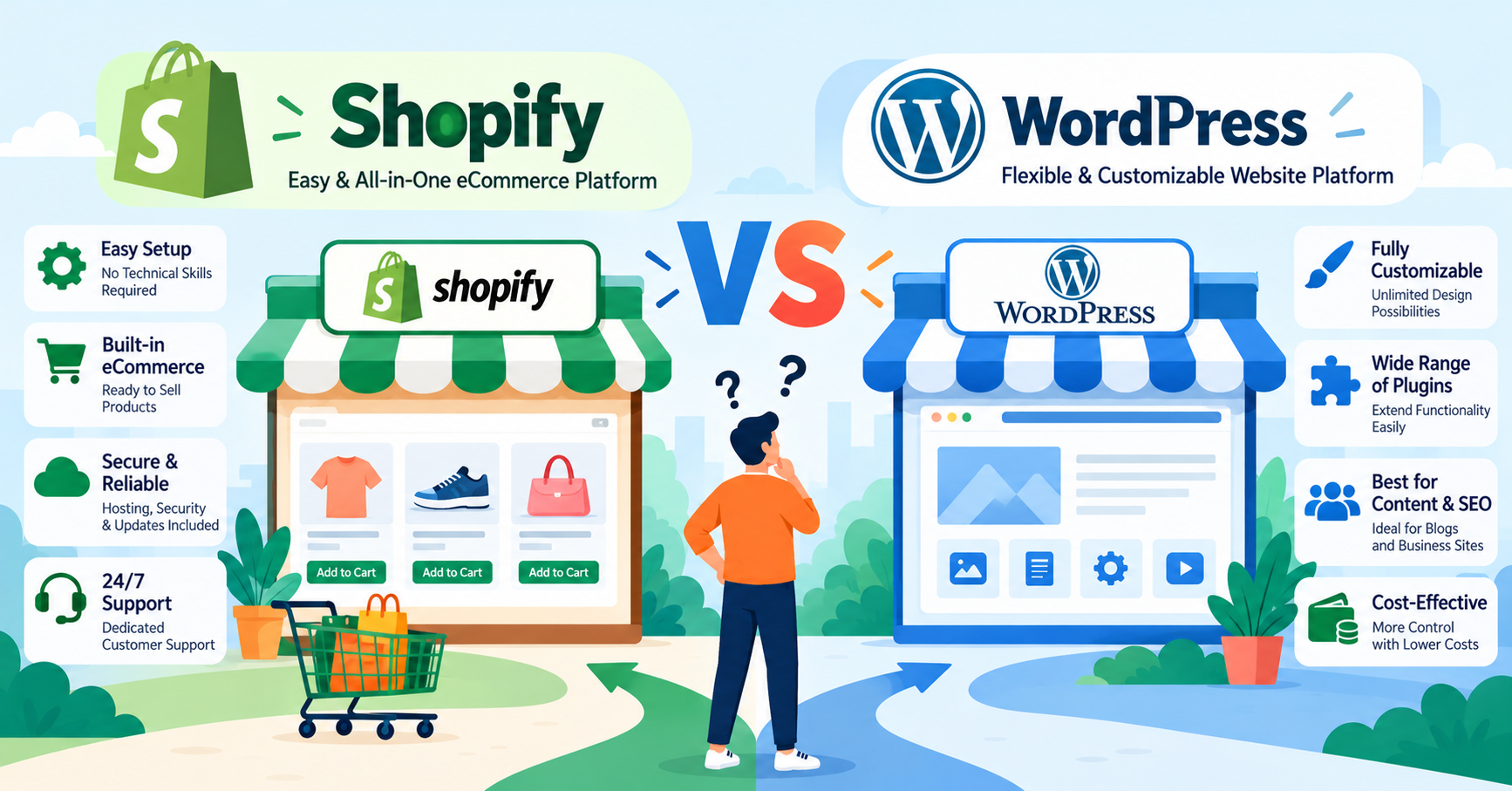
Shopify is the ready-made shop. It is an all-in-one tool made for selling products. You pay a monthly fee. In return, hosting, security, checkout, and updates are handled for you. You mostly just add products and open for business.
WordPress is the empty plot. It is free software that can run any kind of website, such as a blog, a company site, or a store. To sell products, you add a plugin called WooCommerce. (A plugin is a small add-on that gives your site a new feature.) You also need to buy hosting and a domain name. Hosting is the place on the internet where your website lives.
So the main question is simple. Do you want easy and quick, or flexible and fully yours?
[IMAGE 2 — Simple analogy: a ready-made rented shop on the left, an empty plot with building tools on the right]
How Much Do They Really Cost?
Price is where many people get confused. Both look cheap at first. The real cost comes later.
Shopify costs
- A full online store plan starts at around $39 per month on monthly billing. It is about $29 per month if you pay for a full year upfront. Prices change, so always check Shopify's official pricing page.
- A cheaper "Starter" plan exists for selling through social media and links. It is not a full website.
- You pay a small fee on every card payment. If you use a payment gateway other than Shopify's own, Shopify may add an extra fee on top.
- Many useful apps (for reviews, email, subscriptions) have their own monthly price. These add up.
WordPress + WooCommerce costs
- The software is free.
- You pay for hosting, a domain name, and often a premium theme (the design of your store).
- Some plugins are free. Many good ones are paid, usually once a year.
- You may also pay a developer when something breaks or needs custom work.
A simple example: Priya sells handmade candles. On Shopify, she pays one monthly bill and gets a working store in a weekend. On WordPress, her starting cost may be lower. But she must also pay for hosting, buy a few plugins, and spend time on setup. Neither is "cheaper" in every case. It depends on how much of the work you do yourself and how big your store gets.
Which Is Easier to Use for a Beginner?
Shopify is easier. You log in, add a product, pick a design, set up payments, and go live. Everything is in one place. If you get stuck, Shopify has support you can contact.
WordPress takes more effort. You need to:
- Buy hosting and connect your domain
- Install WordPress and then WooCommerce
- Pick a theme and set up shipping, taxes, and payments
- Choose plugins that work well together
None of this is impossible. But it is a lot to learn if you are new. Many beginners enjoy the freedom. Others feel stuck after the first week.
[IMAGE 3 — Side-by-side checklist: Shopify with three short steps to launch, WordPress with a longer list of steps]
How Much Control and Flexibility Do You Get?
This is where WordPress shines.
With WordPress, you own your whole website. You can change almost anything. You can add a blog, a course, a members area, or a custom booking system. There are thousands of themes and plugins. If you want a store that works in an unusual way, WordPress gives you more room.
Shopify is more fixed. It has its own rules and layout. You can customize a lot, and its app store is large. But some deep changes are hard or need special coding. You also depend on Shopify. If they change their prices or rules, you must accept it.
Blogging and SEO: WordPress started as a blogging tool, so it is very strong for content. Shopify has a blog too, and it handles basic SEO well. But for content-heavy sites, WordPress usually feels more natural.
What About Security, Updates, and Daily Maintenance?
Here Shopify makes life easier.
Shopify takes care of security, backups, and updates for you. Your store stays online even on busy sale days. You do not need to worry about someone hacking an old plugin.
With WordPress, you are the one responsible. Think of it like owning a car instead of using a taxi. You must:
- Keep WordPress, themes, and plugins updated
- Take regular backups
- Add security tools
- Watch your site speed
If you skip this, problems can show up. An old plugin can create a security hole. Two plugins can clash and break your checkout page. A slow site can make customers leave. These risks are real, but they can be managed with good care and the right help.
Things get harder when you need extra features. Examples are order alerts on Telegram, a custom payment flow, stock syncing with a warehouse, or automatic invoices. These often need careful setup. A small mistake can mean lost orders or wrong payments. This is the kind of work Earning Planer IT Services builds for businesses, including automations that start from ₹999 with no monthly Zapier-style fees. If your store needs something custom, it is worth getting it built correctly the first time.
How Do They Handle Payments and Growth?
Shopify
- Has a built-in payment system (Shopify Payments) in supported countries.
- Checkout is fast, simple, and well tested.
- Scales well as your orders grow, without you managing servers.
- Availability of some payment options depends on your country, so check this before you commit. This matters a lot for sellers in India.
WordPress + WooCommerce
- Works with many payment gateways, including local ones.
- Gives you full choice over how checkout looks and works.
- Can grow big, but you must pay for stronger hosting and keep things optimized as traffic increases.
A simple example: Rahul runs a small clothing store and expects 20 orders a day. Shopify handles this easily with no extra setup. Meera sells in a local market and needs a payment gateway that Shopify does not support well in her area. For her, WooCommerce may be the better fit because it works with many gateways.
[IMAGE 4 — Growth chart: a small store growing into a bigger one, with Shopify showing a smooth path and WordPress showing a path with extra upgrade steps]
So Which One Is Right for You?
Here is a quick guide.
Choose Shopify if:
- You are a beginner and want to launch fast
- You want fewer technical worries
- You mainly sell products and do not need many unusual features
- You are fine with a monthly fee and some app costs
Choose WordPress with WooCommerce if:
- You want full control over your store and data
- You already have a WordPress website or a content-heavy blog
- You need special features or local payment options
- You are comfortable learning, or you have a developer to help
Think about a custom-built store if:
- Your business has special rules, such as custom pricing, bookings, or a unique ordering flow
- You want to avoid ongoing platform fees and limits
- You plan to connect your store to tools like Telegram bots, Mini Apps, or your own systems
[IMAGE 5 — Decision flow: a simple "If you want X, pick Y" diagram with three paths for Shopify, WordPress, and custom build]
Frequently Asked Questions
Is Shopify better than WordPress for beginners? For most beginners, yes. Shopify is simpler to set up and needs less technical knowledge. WordPress is better if you are ready to learn more in exchange for more control.
Is WordPress cheaper than Shopify? It can be cheaper at the start. But hosting, plugins, themes, and developer help add up. Compare the full yearly cost, not just the first month.
Can I move from Shopify to WordPress later, or the other way? Yes. You can move products, customers, and orders. It takes planning, and some design work must be redone. It is easier to choose well at the start.
Which one is better for SEO? Both can rank well on Google. WordPress is a bit stronger for blogs and content. Shopify covers the basics well. Good content and a fast site matter more than the platform.
Do I need a developer for either one? Not to get started. For custom features, payment setups, or fixing problems, a developer can save you time and stress.
Final Thoughts
There is no single winner. Shopify is the easy path for quick, simple stores. WordPress is the flexible path for people who want control. Pick the one that matches your skills, your budget, and your plans for the next few years.
If neither fits your needs, or you want a store built around how your business really works, Earning Planet IT Services builds custom web apps on the MERN stack, along with Telegram bots and Mini Apps. You can see more of our work at earningplaner.com. Tell us what you want to sell and how, and we will suggest an honest, practical plan.
[IMAGE 6 — Closing image: a happy shop owner with a laptop showing a finished online store and a small checklist ticked off]
Need a Professional Project?
We specialize in MERN Stack, Telegram Bots, and SEO-optimized web solutions. Let's build something amazing together!